Showing posts with label Software. Show all posts

Tuesday, December 19, 2023

Download Windows 11 ISO Files (64-bit Official Links)

 Microsoft has

     officially released Windows 11, a new era for computers, as they claim. Like Windows 10, Windows 11 ISO files are also available for download for free from Microsoft. You can clean install Windows 11 or upgrade from Windows 10. 


    You can install Windows 11 on your computer in many ways. However, there are certain prerequisites that must be met before Windows 11 can be successfully installed. The system hardware should meet certain minimum requirements before Windows 11 can be installed on your device.

    See if your PC meets Windows 11 minimum system requirements

    This page will guide you to download Windows 11 ISO files using different methods, create a bootable USB drive and install Windows 11.


    Download Windows 11 ISO directly from Microsoft

    You can also download Windows 11 ISO files directly from Microsoft’s website, with even more language options.

    Open Microsoft’s Windows 11 download page in any web browser.

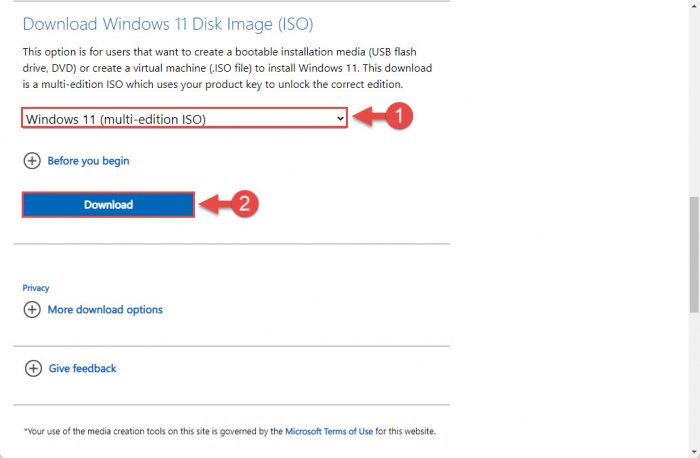
    Scroll down to the page and select “Windows 11 (multi-edition ISO)” from the drop-down menu under Download Windows 11 Disk Image (ISO) and then click Download.

    Select ISO to download
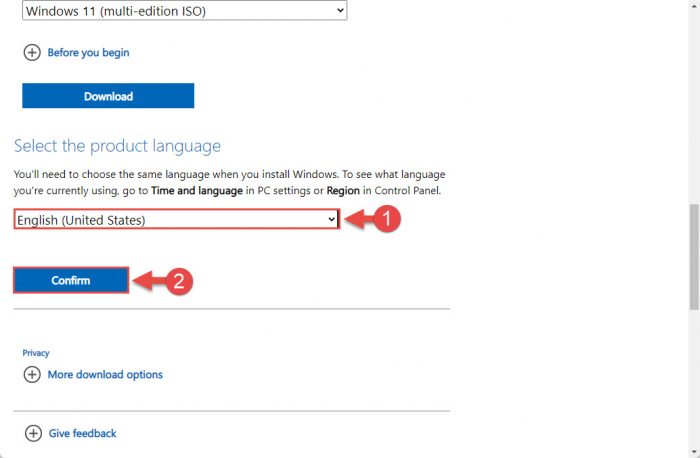
    1. Next, select the language you wish to download Windows 11 from the drop-down menu and then click Confirm.

      Select language
      Select language
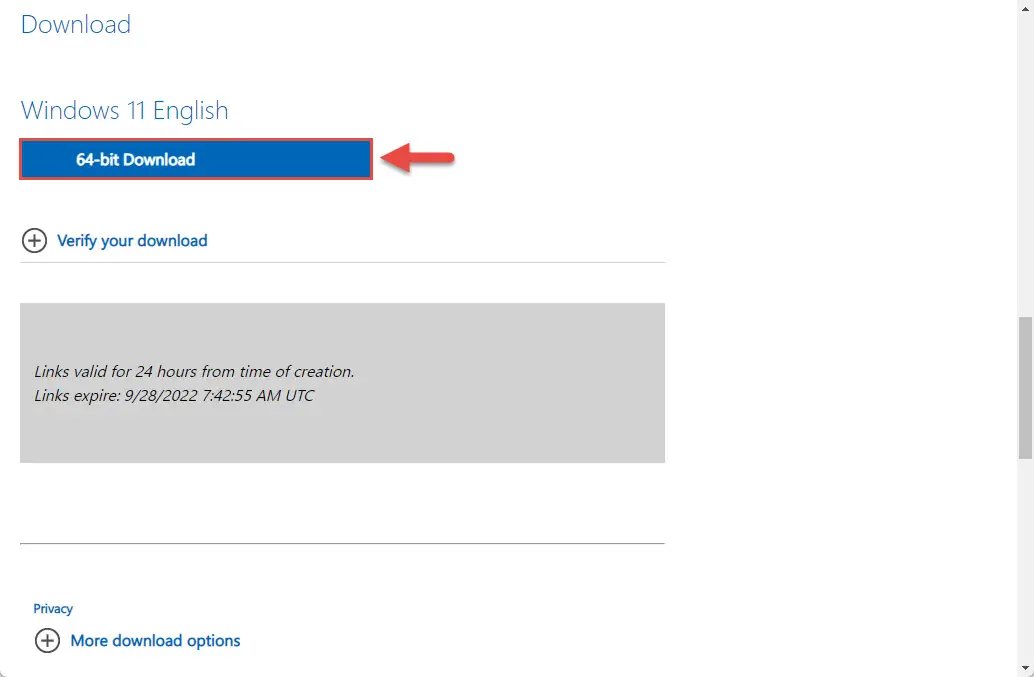
    2. Now, click the 64-bit download button, and your Windows 11 ISO download should now begin.

      begin download 1
      Begin downloading


    3. Download Windows 11 ISO

      VersionPlatformDownload
      Windows 11 23H264-bitDownload ISO
      Windows 11 22H264-bitDownload ISO
      Download Torrent (magnet link)
      Windows 11 21H264-bitDownload ISO
      Download Torrent (magnet link)

    Monday, December 18, 2023

    Download Windows 10 ISO directly using Edge or Chrome Browser

     When browsing to the Windows 10 download page on my Linux System I noticed the page displayed differently to Windows. On Windows 10 it only allows you to download the MCT (Media Creation Tool). Once this tool is downloaded it creates a bootable USB directly or you can download the ISO within the tool.

    By directly accessing the ISOs from the website you have more options such as different language versions and it is faster than having to install and run through the tool. The ISO contains an install.wim file whereas the MCT created USB contains an install.esd file. When creating a custom Windows ISO image you need to use the install.wim. The ESD file can be converted to WIM but requires an extra step.


    How the page looks on a Windows 10 computer

    When visiting the Windows 10 download page from Linux the URL redirects to:
    https://www.microsoft.com/en-us/software-download/windows10ISO
    In place of the Media Tool it offers to select Edition:

    Download ISO using Edge browser or Chrome


    To view the same page on a Windows device we will need to change the user agent in developer tools.
    To do this in the Edge browser press Ctrl+Shift+I to display the developer tools pane on the right.

    Click on the 3 dots on the top right > Click More tools > Network conditions

    At the bottom of the screen > untick the box Select automatically > Select Custom… in the dropdown box and type in linux

    After completing the above steps refresh the Windows download page. You should see the following page display with the url changed to ISO at the end.

    ISO Page Display
    English International ISO is an option
    There are many language options available

    Other Options

    When opening the download page on a mobile phone browser the same redirected ISO page is displayed. You could activate the temporary download link from your phone and email or text it to your messaging app on your computer to download that way.
    Another good option is TechBench which provides an interface to download ISOs directly from Microsoft servers. This is a good option if you want to download previous version ISOs, Insider Preview versions and other Microsoft Software to test.

    Browser on Android
    Google search: TechBench
    TechBench interface

    Enterprise Edition Evaluation

    The Enterprise Edition of Windows 10 is available as an Evaluation from the Microsoft Evaluation Center.
    This is a 90 day trial and comes in 2 versions the Standard Semi Annual Channel (SAC) or the Long Term Servicing Channel LTSC version.
    It can also be downloaded from TechBench mentioned in the previous section.

    Windows 10 Free Download Full Version ISO 32 Bit & 64 Bit - 2023

     Windows 10 Free Download Full Version ISO 32 Bit & 64 Bit 2017- PC – OS developed by Microsoft as part of the Windows NT family of operating systems.

    Today we are going to share the method Windows 10 Free Download Full Version ISO 32 Bit & 64 Bit 2017. Windows 10 is a personal computer OS developed by Microsoft as part of the Windows NT family of operating systems. Officially unveiled in September 2014 following a brief demo at Build 2014, the operating system reached general availability beginning on July 29, 2015. Windows 10 introduced revisions to the operating system’s user interface, including the addition of Start menu similar to Windows 7 but incorporating Windows 8’s live tiles, a virtual desktop system, a notifications sidebar, and the ability to adjust user interface behaviors based on available input devices — particularly on laptops. Windows 10 provides integration with additional Microsoft services.

    Name: Windows 10 32 bit and 64 bit versions in English language.

    File Name: Windows 10 Technical Preview-9879-x32-EN-US.iso (32 Bit),

    Windows Technical Preveiw-9879-x32-EN-US.iso (64 Bit) Compatibility: 32Bit(x86)/64

    System Requirements of Windows 10

    Those users who are excited to explore the features of windows 10 must have to know the requirements of this windows OS firstly.

    1. Memory is 1GB RAM for 32 bit and 2 GB RAM for 64 Bit.
    2. 17GB Free Hard disk space required.
    3. 1 GHZ processor required must or higher.

    Download ISO 32/64 Bit and Windows 10 Upgrade

    Click on below button to start Windows 10 Download ISO 32/64 Bit Free of cost. This is Technical Preview released by Microsoft yet.  You can easily download and install it via USB or DVD.

    Windows 10 32 Bit

    Windows 10 64 Bit

    Serial Key for windows 10

    Technical: NKJFK-GPHP7-G8C3J-P6JXR-HQRJR

    Technical Code for Consumer: 334NH-RXG76-64THK-C7CKG-D3VPT

    Technical Code for Enterprise: PBHCJ-Q2NYD-2PX34-T2TD6-233PK

    Windows 10 Home: KTNPV-KTRK4-3RRR8-39X6W-W44T3

    Windows 10 Pro: 8N67H-M3CY9-QT7C4-2TR7M-TXYCV

    Windows 10 Enterprise: CKFK9-QNGF2-D34FM-99QX2-8XC4K


    How to Download Window 10 ISO 32/64 BIT ( Official Website )   Click Here


    About Me

    My photo
    Certainly! If you're looking for guidance on writing an introduction for a specific purpose, such as a personal introduction, a professional bio, or an introduction to a piece of writing, please provide more details so I can tailor the information to your needs.

    Lorem Ipsum is simply dummy text of the printing and typesetting industry. Lorem Ipsum has been the industry's.